I have added an AI agent to my website, just to demo what I can do, this model is learning about me as we go, so pleas be paitent, this is a new RAG model
About Ryans Career
Welcome to my portfolio, here you will see a history of my projects and key points, below are some quick links to help quick navigation.
I am always happy to answer questions, so please feel free to contact me with the contact form found in the below buttons.
You will find areas of my working overlap, for example my leadership style can be seen in the "What leadership means to me" area, however at the end of the "ISO 270001" section you will see examples.
A fun fact about Ryan.
I am a very big animal person, this has lead me to find some peace in volenteering with an animal rescue. During my time at the rescue I have learned a lot about myself and animals.
A day at the rescue can range from helping clear out the fields to earning the trust of a mistreated animal. Showing them that some humans are there to help and be their friend, seeing that light in their eyes shine as they realise I'm there to help; well that's what makes the hard work so rewarding!
Leadership -
What does leadership mean to me?
This means working with my team, being hands on, after all I can only leader by example and I can only evaluate those who's jobs I fully understand. To make a positive impact is to lead from within. To elevate my team to reach their potential, help them learn new skills, achieve their goals. I learned this from an old boss of mine, I still admire him to this day!
By doing this, you become a leader that is revered, not a boss that is feared.

I am not a micro manager, I trust my team, if someones performance is dropping it's reasonable to check in with them privately, maybe there is something stressful going on for them. If you can be there to provide some adjustments once that cloud has passed their loyalty to you only grows stronger and their work will be better than ever in most cases.
If someones performance is improving, that's the dream, however to keep that trajectory I like to have a clear acknowledgement of such success. I find this motivates the team member/s more, while potentailly inspiring other team members to follow suit. Think back to a time, one where you were pulled aside and prasied, how did you feel? Motivated? I sure did.

Automated technician project. (Demo is avalible upon request)
This project is a project of imagination. My client, a small business came to me via a recomendation from a mutal business partner, wonderful people however a very tight budget. They really wanted me to be able to stay full time. However their business is seasonal, so this wasn't something they could sustain.
I asked my client "What if I could be here, without being here?" I know their main IT issues, I know how these issues are resolved. "What if I build you a 24/7 engineer with no licence fees and this can maximise your uptime." My client was amazed and curious.
The next day I had a demo, how this works is a powershell scripted as a delayed logon task. This loads a small window that monitors the network connection and shows a colour based upon the results of a ping test to 8.8.8.8
An additional feature to this is if you click in the top right hand corner a small winforms window opens up, using mostly try and catch powershell commands I added in a menu and a sub menu.
Examples -
Example 1 -
Back ups - Backup solutions are expensive for a small business, however they have 1TB of Onedrive storage, to allow for a form of shadow files that is user friendly there are two options, you can create a weekly backup on Fridays at 5pm, leave your PC on and it will create a folder if this doesn't exsist. Then a sub folder date and time stamped copying the user profile areas of Desktop, Downloads, Pictures and Documents. A 5 hour window is allowed for the copy to complete and the cloud sync then the PC shuts down automatically to save power.
There is a manual option too. This is a great option if you feel your machine is failing and would like to be safe until a professional can advise on the situation.
Example 2 -
Auto build and repairs (Almost similar to zero touch deployment) The auto builder is for when they get a new laptop this can install most applications silently and in a sequence, set the script off and it will tell you when the installs are completed and open a guide on the next steps automatically. With the repairs, lets say websites are displaying incorrectly, email issues are occouring and a reboot hasn't fixed this. Well lets say webmail is being used here. There are buttons for Chrome and Edge to clear the cache, cookies ETC. should this fail there is a button to reset the Network stack This automatically elevates the Powershell instance, then forces the elevated session to reset to standard permissions to minimise risk. The downside, local admin is required for this one. however with some basic training a nominated team member can have these details.
Dual Data Migration Project -
Email Migration -
Early 2020, we were tasked with tackaling a project of email migration, two of us working as one to plan a double migration. From a corrupted Exchnage 2008 server to Server 2016, then over to Office 365 (Exchange). There were over 1500 user mailboxes, 300 shared mailboxes, Teams that needed to migrate simaltaniously some across multiple sites. This was completed with only two minor issues. one shared mailbox didn't migrate correctly and this issue had a downtime of only 15 minutes before a permanent fix was found and implemented.

This project had to be performed manually for each mailbox, we achieved this with a high level of planning, documentation and logging of risks and roadblocks with plans of how to tackle potential issues. Ultimately thanks to our preperation this project was a very big success.
We did have a team of 6 engineers under our scope, however this happened during Covid meaning for a period there was working remotely ensuring our team was able to complete thier tasks. This provided an interesting challange as a team leader as we were unable to prepare much in advance for such a change.
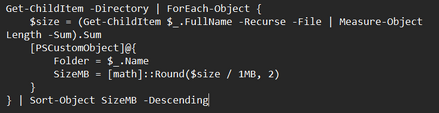
Roaming Profiles to Onedrive -
With support of roaming profiles due to end in the very near future our team was tasked with migrating the accounts of the staff from our local servers with roaming profiles to Onedrive.
Once again this was done manually, this time due to budget restrictions. Covid was a hard time for all and with the purchase of additional laptops and new software to enable working remotely we had another hurdle to overcome. We however saw the silver lining here. We were able to provide staff with training as we made the changes meaning that along with our guides there was hands on learning, making this more memorable.
The manual method we used was to run a command similar to that in the above image. What this command does is map out the folders in a directory and outputs their sizes, already sorted from largest to smallest, this was exported to a log file which isn't detailed in the example. This was important as we could then plan the larger folders to migrate over night minimising the interuption and also speeding the project up considerably, we could perform the small data migrations in the day, leading us to hit 30-50 each per day depending on the working style, and set off those over a threashold size overnight.

Wi-Fi Refresh -
With an outdated range of access points, that were no longer in support and antennas were hard to source it was time to upgrade.
This was a multi site project that took 3 months to complete.
We started by working with a 3rd party to obtain a heat map, by doing this we could ensure a strong signal strength in all locations and no areas where you may hop between two access points causing an intermitent connection.
We also used this data to plan our cable runs, testing any exsisting cabling we may use and running new Cat 6 cable where there were no exsisiting connection points or the exsisting cables were degraded.
Taking this approach allowed us to buy less access points, yet still provide top teir service. each site had a hot spare so if one were to fail the downtime would be minimal.
Budget Management And Acquisition Project-
My client had just aquired a competitor of thiers, they needed to have their new sister comapnies IT assessed and adhearance to their standards confirmed with any issues resolved promptly.
As with everything I do, I automated my information gathering, looking at the fleet primarily the age of their machines based upon their processor generation, TPM type, RAM capactiy and generation. For the back end I was looking at the model of servers, resource consumption, operating system E.G Windows Server 2016.

I had a budget of £150,000 to correct all the problems I could find. I found that 60% (120) of the desktop fleet was outdated and required replacement. 5% (10) of the mobile phone fleet were outdated and no longer supported by the manufacturer. Their file server required a rebuild from scratch (thankfully this was virtual so I could avoid a wipe prior to getting the new server up and running.) Also thier backup solution, although it worked, was not compliant with my clients policies.
Working closely with the COO I reported my findings with two reports, a summary overview 2 page documents for those who just wanted to be in the loop but lacked full interest and a detailed report in clear jargon free language for those invested or curious. The main change I made here was to avoid Desktops and replace these with Laptops seeing that Intune was booming since Covid, using docking stations allowed us to keep the exisiting screens allowing for dual monitors and also less cable mess.
For the phones and Desktops I sent out an RFP to the top three vendors my client used. In this I detailed the specs and prefered models of both desktops and mobiles we required. As I awaited the return of these proposals I got to work on the backups as a priority (As the file server was unstable) I had a fire safe in my office, this work was planned for a Friday at 6pm as there would be no changes made over the weekend making this the ideal time to migrate file servers. At the time and created a physical backup of their data to a NAS using Raid 10. This was done as the data retention was P1, this was then placed in the fire safe and taken to our main office acting as our off site back up. Once this was completed I proceeded to scan the data for any potentail virus', randsom ware, malware and root kits.
While these scans were running I created a new VM ready to become the new file server. I left that evening and the scans were ongoing. They finished before I arrived the next day (Saturday). Once I confirmed that my new server was working as expected, the shares had been configured correctly and my new server was stable I copied the data over using a script that would do this as one top level folder at a time meaning any errors wouldn't have a major delay. Once this was completed I amedned the group policies (How the shared server files became useable to staff) to change the drives to my newly created server and removed the network ability of the old server, leaving it powered off for a projected 60 days allowing time for any files noted as missing to be recovered without the need to access the off site backup.
Once the RFP's had been returned from ou suppliers, I reviewed the plans, spoke with the supplier who offered us the best deal and arranged a breif meeting with the COO and CFO to discuss the next steps prior to raising a PO. While this order was being placed I then ammended the SCCM Task Sequence (This is how we quickly and consistently deploy computer configurations) to include the new drivers that allow Windows to use the hardware correctly. while including the sooftware that was not currently being deployed to the computers. I had created further reports for this meeting, a change request, impact assessment, risk and mitigation report and cost benfit analysis with a timeline attached.
Due to the volume of work I assigned our JR engineer the task of building these computers. His role was to replace these at the desks of the outdated hardware and set them off to automatically build. To do this he had to build the laptop at our build area and have this ready for the end user before removing any old equiptment.
Once all of these steps were completed the final step was to export our Group Policies and import these to the newly aquired business. I had to change all of the spesific details such as server names, filtering objects (WMI filters)
The next step in the project was to have the laptops enrolled to Intune (Co-Management) document the changes I had made and generate a network map with a future roadmap of how I recomended the estate to be maintained when each remaining desktop was going to be end of life ETC.
Thanks to a long lasting relationship with our suppliers, having a JR in house that we were able to utilise we came in 10% under our budget. We were able to save money on our backup solution as we no longer required the one from our new sister company and ou exisiting licence enabled us to backup our additial VM's for a fraction of the cost.
*Figures relating to item counts are rough please allow a tollerance of 5-10.
**There was a lot more to this, however I have limited this to have a basic example of this project.

Stakeholder Engagement -
I have found in my career there are different types of stake holders and how to engage them. Each will have a different level of influence and interest. However it's the interest part that means the most.
With a stakeholder with low interest regardless of their influence I find the key is to be concise however welcome questions and their ideas, while being welcoming.
However on the otherhand, you can have the very interested, this takes a little more finesse, you need to asses why are they interested? Do they have a fondness for tech? Are they interested in just one aspect such as how this helps them, automation or just the financial impact for example.
High interest stakeholders are amazing assets, their interest can become contagious within their meetings. To keep high interest stakeholders engaged and not tired I title my documents, much like I have with this website, as a recruiter you may not be looking at my migration experience, however you may want to know about my budget management. For this reason I added quick links that will take you to the section you're looking at, keeping you more engaged than scrolling and looking at each title unsure of what is in the next section.
However the core elements are the same, they all want to be heard, informed, respected and in control.
Below I have copied snippets of what I learned over the years -
Profile -
- Their influence
- Their interest
- Their concerns
- Their incentives
- Their pain points
Executives - Risk, cost, outcomes, timelines
Managers - Resources, workload, disruption, positive impact
Technical teams - Feasibility, clarity, dependencies, training
Compliance/Audit - Controls, evidence, traceability
End users - Ease of use, disruption, training, level of support provided in the event of an issue
A good guideline is to outline the problem, how this issue is impacting the business, how we can take this as an opertunity finally detail if there is a risk if we don't take any actions.
I also find that stakeholders are more fact focused, so I provide evidence supporting my document such as -
- Metrics
- Logs
- User feedback
- Cost analysis
- Risk assessments
- Compliance gaps
- Benchmarking
It's just as important to show that you have taken the time to assess this apporpraitely and this is a wise use of their time, I demonstrate this by providing options with each detailing their respective impacts. Other good ways to demonstrate this are -
- A rollback plan
- A test plan
- A communication plan
- A clear impact assessment
By doing the above, involving stakeholders at the appropriate time, not too early and more importantly not too late you build a good rapport meaning when you need them they are more likely to advocate for you.
Switch Refresh -
We were tasked with taking out the older switches and replacing these with Meraki Switches, as in house specialists we knew there was known improvement we could make here. This was how long it would take on responce of an email to reconfigure a port.
This would always be done ASAP, however on occasion, this could be the next day meaning there was unneccesary downtime.
How we addressed this improvment -
We grouped the ports, for this example I will make the following assumptions -
- 48 port switch
- Switch is in a server room not a hub room
- The switch is not stacked
- There are 24 computers
- There are 3 printers
- There are 2 Access Points
- The company is prodicted to grow 10% in the next 12 months
We grouped our ports and created a physical map. We done this by taking into account the comapny was set to grow 10% in the next year, we set ports 1-30 to the data Vlan, allowing computers to communicate with the servers, we also tagged the Voice Vlan for Soft phones.
Next we assigned ports 31-35 for printers, this allowed for an additional MFP/MFD and also should a private printer be needed in the area for an Exec or HR.
Ports 36-39 were assigned for Access Points, again allowing for expansion.
Ports 40-48 were assigned as overflow, these were left unconfigured and would be grouped and assigned as required based upon avalibity of the other ports, so if all the Data VLAN ports were in use we would assign a few overflow ports in anticipation.
Ports 49-51 were Fibre with SFP adapters, these would connect items such as a SAN, VM hosts, other switches ETC.
For our map we printed out a diagram of the switch, ports numbered above and below the ports respectivly. There was a pack of coloured dot stickers in a polly bag on string, these stickers would be used to colour the ports, in example if a port had a green sticker this would tell a technician this is a data port, this way the technicians could do their jobs without delay. We also minimised the risks of giving out permissions without reason. Should a VLAN be changed such as the overflow, I could email a technician and say hey please update the diagram port x with x coloured sticker, please let me know once this is done.
ISO 270001 -
This was a large project I was leading, the first step was to assess which controls were applicible so I could create our SOA.
To achieve this I had to define the context of our organsiation.
- What we do
- Who are our customers
- What data to we keep / handle
- Our obligations, Legally, Regulatory or Contractual
- All issues that may affect security, physical and digital.

I folowed similar breakdowns to identify our interested parties, how we would define the scope of our ISMS, were we looking at only doing our main office? or satalie offices too?
The next step was to identify our risks in a risk assessment, and assign these risks a score of threat level and likelihood of occouring.
With the Risk assessment completed, I was then able to identify the Annex A controls, in example there was a risk of unautherised access, the controls that apply here are A.5.15,A.5.17 and A.8.2.
Once our SOA was completed we could assess what areas we would not be compliant in and define a road map to success. This can be completed alone however I had a team of two that were also the IT team with me, I knew my team fairly well, I knew their current skillsets and carer goals. This helpped as there were several risks we needed to address, I was able to work with my team and delegate work to my team based upon their skills and keep their investment by saving those areas that alligned with my teams personal carer goals for nearer the end.
By using this method I had my team invested in our success and the quality of work from them; well I was proud to present this! My team members were both happy with the outcome as they had now gained exposure to the areas of their interest. The stake holders were very happy as we could now apply for our certifcation and arrange for an auditor to assess our ISMS. They will interview staff, this can be either remote or in person. Ours was in person.
All that was left to do was ensure that our new policies and procedures were followed ready for our yearly audit to maintain our certifcation. Also we needed to celebrate our success. I spoke with the IT director as I felt the team had given their all to this project, I wanted to try and reward them for this. They were given two addtional days off, they could take as they pleased, no time limit, a one off bonus along with a glowing addition toward their end of year review which ensured they recieved atleast a part of their performance bonus.

Technical Support -
My career started in IT support with an MSP, as I have grown throughout my carer I have always reamined hands on allowing me to keep my skills sharp.
Below is a brief list of what I have supported throughout my career -
Networking -
- DrayTek Vigor
- Meraki (Switches and Access points)
- Cable runs, management, patching
- Comms cabinet replacement
- Hub and Server room renovation
- HP ProCurve switches
- WAN/LAN
- VLANS
- DNS
- DHCP
Windows server and Office 365 -
- Server 2003 - 2022
- Active directory / AAD / Entra and Identity
- Exchange 2008 - 365
- Print Servers
- SQL planned maintenance
- GPO's / Configuration and compliance profiles
- Roaming profiles to Onedrive
- Migrating GPO's to Intune
- SCCM deployment and task sequences
- Application deployment Intune, SCCM and GPO.
MAC OSX -
- Troubleshooting
- Time machine
- Jamf
- Intune management
- Common end user support
At one of my recent contracts from late 2025 part of my duties were to attend to the Helpdesk. In just 5 months I had the leading count in incident resolutions with over 800 support requests from Tier 1 - 3 resolved. This came with a lot of fantastic feedback from the end users. These tickets would range from I forgot my password to issues with the local network stack or Intune.
Policies and Procedures -
I am familiar with updating and creating Policies and Procedures for both small businesses and enterprise enviroments, policies and procedures I have created relate to
- User on/offboarding
- Data retention
- Cyber Secuity
- ISO 27001
- Disaster recovery
- Backup integrity testing and best practices
- And more

Much like my ISO 27001 documents I clearly define the reason this policiy is in place, add in a section to say risks we are currently exposed to or are actively avoiding exposure to and how this policy / procedure will help us achieve this goal. Where reasonable I create a checklist that is to be completed for example when testing the integrity of the backups, I have a check list to say what server was tested, the size of the restore, the time this took, was this cloud or locally restored, who tested this, what time was this started and when did it finish, was this confirmed with someone from the relevant department such as finance? This is then date and time stamped and archived for a predefined period of time. to comply with legal and company policy obligations.
AI Projects -
My recent focus has shifted toward the frontier of AI integration, where I specialize in harmonizing Large Language Models (LLMs) like Gemma, Gemini, and Copilot with enterprise workflows. By deploying both cloud-based and local-host environments, I provide businesses with a unique perspective on AI’s operational impact.
I am a strong advocate for Zero-Code solutions as a high-efficiency, budget-conscious alternative to traditional low-code development—often requiring as little as 20 minutes of staff training to unlock significant productivity gains. Currently, I am expanding my scope from optimizing existing models to the architectural training of 'Alice', a purpose-built proprietary model designed for bespoke organizational needs.
Contact Form
If you wish to contact me, please use the contact form below and I will get back to you as soon as possible.
Testimonies
I have ask a my clients and some prior coworkers to place comments about me in this section, I had one question, what do you think of first when you think of me? This can be anything.
Auto technican Light demonstration -
Please note this version is currently in testing which is why this demo is limited as there are some polishing up requirements with the user interface. I am customising this to suit another clients requirements.
In the video to the right, you will see a green box in the top right hand corner of the screen, this is the basic diagnositcs area, the green colour explains you have access to the internet, great for phone support. From the 25 seconds point in the video you will see I disable my Wi-Fi (this is a test network). When I do this the background changes to red, this indicates that internet access is not avalible. However when I turn the Wi-Fi back on the Green colour returns.
The Automated technician part, in the first two seconds you will see my mouse move to the top right of the diagnostics box, there is a secret button in the top right, set to be invisible by design. this loads up the automatic technician, this window can be customised to suit each business, ammending the buttons, menus, sub titles. the structure is what make this a valuable tool.
This client has an issue with staff saying they have lost work and then log a ticket and the ticket is just to open up the recover documents section of Office Applications. However staff find it hard to remember where all the locations of tools are in Windows. They appraoched me to ask if I can centralise this as they heard a review of this tool. I was delighted to help and asked them what their other most common tickets are and if they would like this tool to do more than this one thing.
A restructure requirement -
For those like me that think powershell is fun. Well as you know over 800 lines for a begineer or 1200 lines for someone more advanced or even if you have multiple revisions like I do, this puts you in danger of repeated logic, a single bad call that can cause breakages.
The good news I have solved this issue for me atleast, likely something a lot of powershell admins try and have success with. I can remove about 40% of the lines by removing the commands from the button click, so in example on button click currently this runs a series of code which can be 40 lines long. My solution is every button click calls an external script, so in 10 lines I could at best turn 400 lines into 10. This adds stability and more predictable behavior from the tools.